
People records, time and payroll—with a clearer history
When someone asks “why”, have the record ready.
Bring employee details, leave, attendance and payroll review into one platform, with a history that helps your team understand what changed and which rules were used.
Availability. For evaluation with sample data. Production authentication and independent payroll-rule validation remain outstanding. Do not upload real employee or salary information to the demo.

Sound familiar?
“Why has my salary changed?” should not become a search through messages and spreadsheets.
HR handles the record. A manager approves the leave. Finance checks the payroll. When the details sit apart, even a simple question can move between several people.
Keep people workflows and their history connected, so your team has a clearer starting point for review.
What makes the approach worth exploring
People operations you can explain.
A final number is only part of payroll. The employee record, time inputs, adjustment and applicable rule matter too. HRMS is built around keeping that history available for review.
Interactive illustration with sample figures.
- Employee record
Basic pay ₹ 52,000 from the salary structure on file since January.
- Time inputs
April attendance: one regularisation approved by the manager, no loss-of-pay days.
- Adjustment
Travel ₹ 2,400 added as a run input by the payroll maker, with a reason.
- Rule version
Tax calculated under rule version v2, effective 1 April, approved by a checker.
- Review stage
Run inputs reviewed, calculated, approved and locked. Each step is a recorded event.
The difference to evaluate is the explanation trail: can your team trace a result back to the records and rules behind it?
What you can explore
Six capabilities. One history behind them.
Employee information in one place
Maintain employee details and reporting relationships through joining, movement and exit.
Leave with a clear process
Review balances, policies and requests without treating every approval as a separate conversation.
Attendance with a review path
Inspect attendance periods and review correction requests.
Payroll with review stages
Work through salary structures, inputs, calculations, approvals and locked runs.
- Inputs
- Calculated
- Approved
- Locked
Useful HR documents
Generate payslip PDFs and standard HR letters from supplied details.
A history behind the change
Inspect recorded events, rule versions and the audit-history check.
Follow one workflow through
How the journey works
- 1
Build the employee picture
Review employee records, departments, reporting lines and changes in employment.
- 2
Bring time and people workflows together
Work through leave requests, attendance corrections, onboarding tasks and employee notices.
- 3
Review payroll in stages
Move a payroll run through input review, calculation, approval and locking. Inspect the rules and adjustments behind the result.
- 4
Keep a history you can inspect
Review recorded changes and run the audit-history check. This supports investigation; it is not an external certification.
Find your situation
Start with the work you actually do.
Understand how the people side is being run.
Growing headcount makes informal approvals and scattered records harder to manage.
Review employee information, people workflows and payroll stages in a shared environment.
Bring your current HR process to a sample-data walkthrough.
Spend the review looking at the right record.
A salary or leave query often needs the employee history, attendance inputs and applicable rules together.
Use recorded changes and review stages to understand a result before approving it.
Ask to see a payroll change from input to final review.
Make common requests easier to follow.
Employees need a place to check information. Managers need a clearer way to review requests.
Explore the employee portal, leave workflows, goals and notices.
Preview both sides of one leave request.
A closer look, without the sales theatre
See what is there. Ask what still needs work.
The local review started the core platform with 24 seeded employees and 651 recorded events. It also exercised supporting AI, geolocation and document services. This is evidence of local evaluation, not a production customer result.
Availability. For evaluation with sample data. Production authentication and independent payroll-rule validation remain outstanding. Do not upload real employee or salary information to the demo.
Take it to your team
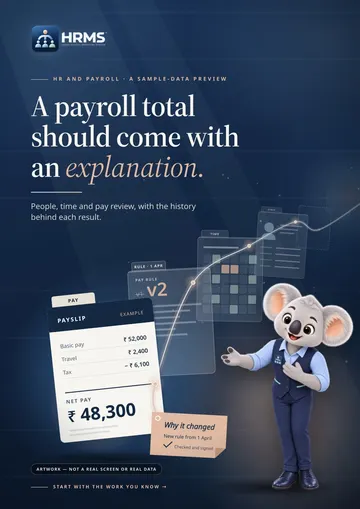
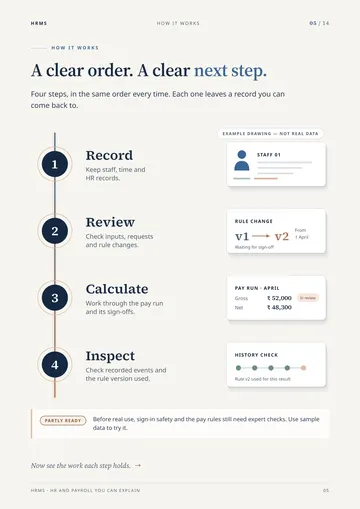
A 14-page brochure for the people who were not in the room.
The same story in a format you can share: the problem, the four-step journey, what the sample-data preview shows and what still needs checking before live use.
Insights
Plain-English reading on HR and payroll review.
 Payroll review
Why has my salary changed? The question payroll should answer
A salary query is simple to ask and often slow to answer. This is what a complete answer needs, and why the trail behind the number matters as much as the number.
 Payroll review
How a payroll run moves from inputs to a locked result
Input review, calculation, approval, locking. What each stage of a payroll run is for, what a reviewer should be able to see, and what locking does not mean.
 Payroll review
Effective-dated payroll rules, explained in plain English
A payroll rule is not just a value. It is a value from a date. Why that distinction matters, and why rule changes deserve a maker and a checker.
Next step
Bring one real workflow question.
Bring your current HR process to a sample-data walkthrough. We can use that starting point to assess fit, show the relevant interface and make the remaining work clear.
Start with a question, not a commitment. Use sample or anonymised information.